Best Off-Road Navigation Apps for Jeeps, UTVs and ATVs
Last updated on October 18th, 2026 at 12:30 am
This post contains Amazon affiliate links. As an Amazon Associate I earn from qualifying purchases, at no extra cost to you.
For most US drivers, the strongest setup is two apps: onX Offroad or Trails Offroad to find trails that are open to your vehicle, plus Gaia GPS or a free offline map app to plan your own route. Whichever you pick, download the maps over Wi-Fi first, because cell service ends long before the trail does.
Phone apps are a planning and tracking aid, not the legal authority. The roads and trails you may drive on public land are set by the land manager, and the section on legality below shows how to check them.
Pick your app in 10 seconds
Choose your phone and the one thing you need most. The picker lists the apps from the comparison table that fit, with the reason and the cost model for each.
Based on the comparison table below: onX, Trails Offroad, Gaia GPS, Avenza and Polaris official pages, the Forest Service MVUM page and Google Maps Help.
The picker only recommends what the sources below confirm. Where a price or limit could not be confirmed on an official page, it points you to the store listing instead of guessing.
It does not rank the apps by quality. It matches a job to the tools that list the feature on their own pages.
Which app does which job
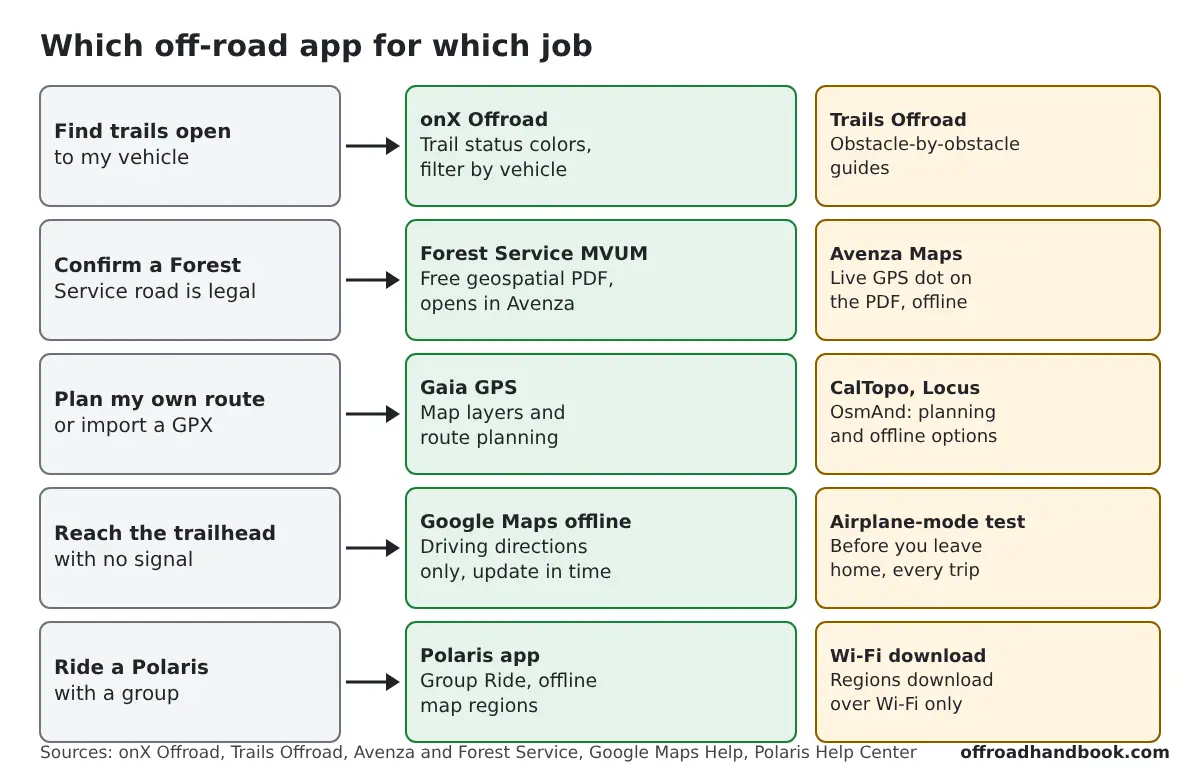
No single app does everything. Trail finders like onX and Trails Offroad tell you where to go. Planning apps like Gaia GPS and CalTopo help you build the route. Avenza carries the official legal map.
Plenty of owners run two of them. A trail finder for the route, plus a planning or legal-map app for the details.
Every row comes from the app maker or agency page linked in the first column. Prices change, so confirm them in the store before you buy.
| App | Platforms | Offline | Standout feature | Cost model |
|---|---|---|---|---|
| onX Offroad | iOS, Android; CarPlay and Android Auto on Premium | Yes, maps stored on the phone | Color-coded open/closed trails, filter by vehicle, land ownership colors | Premium $34.99/yr, Elite $99.99/yr, 7-day trial |
| Gaia GPS | iOS, Android, web | Offline maps come with Premium | Big map catalog, route planning, 4x4 and hiking | Free app records and navigates; Premium by membership |
| Trails Offroad | iOS, Android, web; CarPlay and Android Auto | Download whole states; offline track recording is All-Access | 2,700+ guides, 4,600+ Scout Routes, GPX downloads | Free account is limited; All-Access is yearly, 7-day trial |
| Polaris app | iOS, Android | Offline map regions, Wi-Fi download only | Group Ride, Follow the Leader | Check the store listing |
| OsmAnd | iOS, Android | Fully offline navigation | OpenStreetMap data; contours via plugin | Check in-app pricing for plugins |
| Locus Map | Android, iOS (Locus Map Lite) | Offline maps and routing | Very customizable, LoMaps vector maps | Premium upgrade |
| BackCountry Navigator | Android | Offline topo maps; saving maps needs membership | Topo maps, XE and PRO versions | XE membership; PRO paid app |
| AlpineQuest | Android | File-based offline maps | Custom map files, GeoPackage and MBTiles in full version | Lite free; full 14.99 euro one-time |
| Avenza Maps | iOS, Android | Yes, PDF maps with a live GPS dot | Forest Service MVUM PDFs | App free; each map has its own price |
| CalTopo | Web, iOS, Android | Mobile app downloads maps | Slope-angle shading, planning layers | Free to start; paid plans |
| Outdooractive | iOS, Android, web | Save routes and regions offline | Hiking and biking routes, Pro and Pro+ maps | Free app; Pro and Pro+ plans |
| Hema 4X4 Explorer | Mobile | Offline maps and layers | Australian 4WD maps; guide only, not turn-by-turn | Free tier; Explorer Pro subscription |
| ExplorOz Traveller | Mobile | Offline maps for Australia | Campsites, routes, reviews | Membership |
| Google Maps offline | iOS, Android | Driving directions only; update before expiry | Road navigation to the trailhead | Free |
| Komoot | iOS, Android, web | Download your route | Hiking, cycling and running routes; no driving | Free account |
Two columns decide most buying choices: offline behavior and cost model. A free app that downloads nothing is useless without signal.
The Australian entries are there because owners often ask about them. They add nothing for US trails.
How to check a trail is legal before you drive it
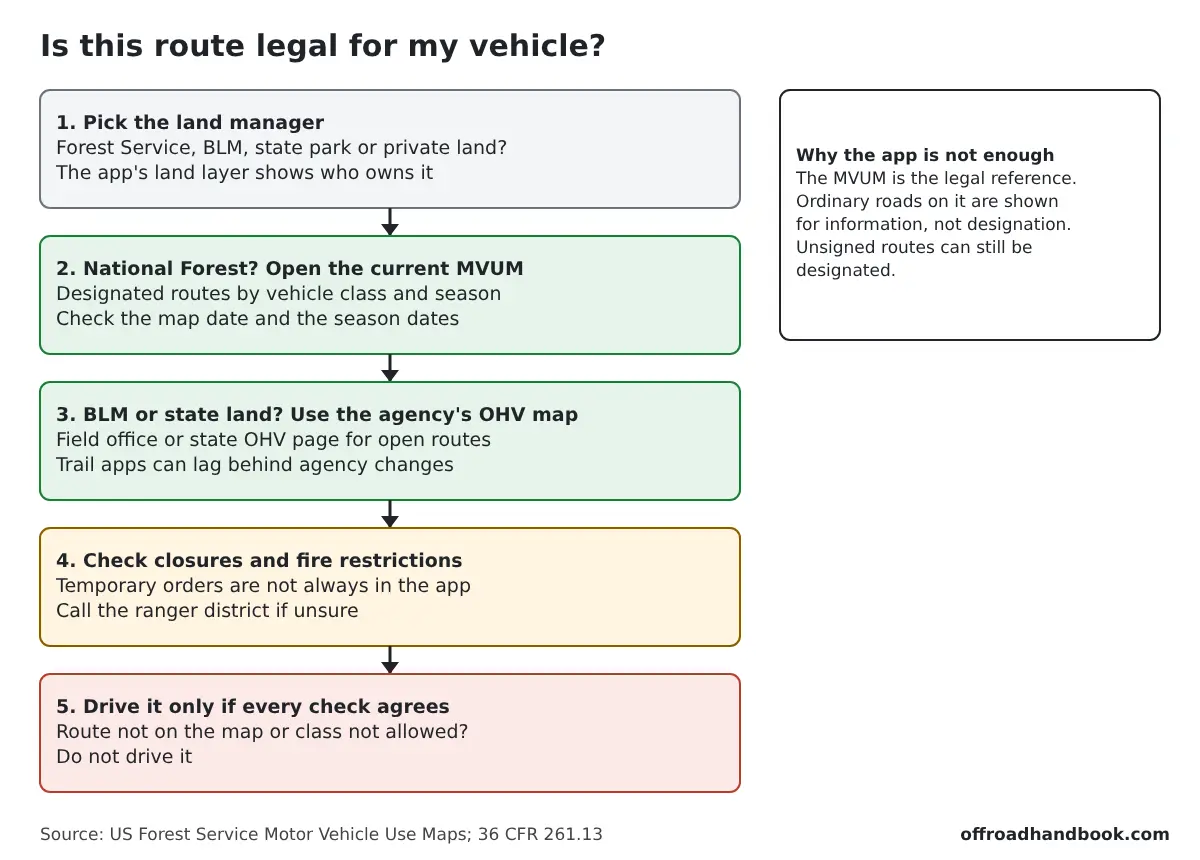
On National Forest land, the Motor Vehicle Use Map (MVUM) is the legal reference. The Forest Service says routes not shown on it are not open to public motor vehicle travel, and that driving off designated roads and trails is prohibited under 36 CFR 261.13 (Forest Service MVUM page).
- Find out who manages the land. An app's land-ownership layer is a good first look: onX colors BLM, National Forest and national park land.
- On a National Forest, download the current MVUM for that forest and check your vehicle class and the season dates.
- On BLM or state land, use the field office or state OHV agency map for open routes.
- Look for closures and fire restrictions. Temporary orders may not be in the app yet.
- Drive it only if the route is on the map and your vehicle class is allowed. Ordinary public roads shown on an MVUM are there for information, so check the legend.
The Forest Service notes that designated routes may not always be signed on the ground but are identified on the MVUM, and that the traveler is responsible for staying on them. Our guide to off-road trail etiquette and rules covers the trail-manners side.
The 15 apps, one by one
1. onX Offroad
Built for off-road driving and riding in the US. Trails are color-coded, green for open and red for temporarily closed, and tapping one shows closure dates. You can filter trails by vehicle, and land ownership is color-coded.
Best for: Finding open trails near a new area. Watch out for: The best features need a subscription. Our onX Offroad vs Gaia GPS comparison goes deeper.
2. Gaia GPS
A hiking, ski touring and 4x4 app with a large map catalog and a web planner. The free app records, tracks and navigates, while Premium adds offline maps and route planning.
Best for: Owners who plan their own routes and like layering maps. Watch out for: You need Premium for offline maps, so test the free app first.
3. Trails Offroad
A trail-guide app with more than 2,700 guides and over 4,600 bonus Scout Routes. The All-Access membership adds custom navigation and tracking, printable guides and downloadable GPX files. It also lists CarPlay and Android Auto support.
Best for: Choosing a trail that fits your rig and experience. Watch out for: A free account only gets preview guides.
4. Polaris app
Polaris lets you download offline map regions from the app, and regions download over Wi-Fi only. Group Ride keeps a group connected and adds a Follow the Leader option.
Best for: Polaris RZR, Ranger, General and Sportsman owners riding in groups. Watch out for: Test the offline download at home before you rely on it.
5. OsmAnd
An OpenStreetMap-based app whose navigation works fully offline on iOS and Android. Contour lines and hillshade come through an additional plugin.
Best for: Anyone who wants offline maps without leaning on a trail-guide subscription. Watch out for: The interface has a learning curve, and trail legality is not its focus.
6. Locus Map
A highly customizable app with offline maps and routing. It is on Android and on iOS as Locus Map Lite.
Best for: Tinkerers who want control over map sources and displays. Watch out for: Premium features sit behind an upgrade.
An Android app for offline topo maps. BackCountry Navigator XE is membership based, and PRO is a paid app where some maps need an extra subscription.
Best for: Android users who want dependable offline topo maps. Watch out for: Android only.
8. AlpineQuest
An Android app that reads file-based maps from storage. The free Lite version has basic map display and waypoints, and the full version is a one-time 14.99 euro purchase.
Best for: Remote-area navigation on an Android phone with your own map files. Watch out for: Android only, and track and route tools are in the paid version.
9. Avenza Maps
The Forest Service offers MVUMs as geospatial PDFs, and the free Avenza app shows your GPS location on them, offline.
Best for: Checking which forest roads are legal for your vehicle class. Watch out for: You must download the correct and current map for each forest.

10. CalTopo
A web mapping tool with a mobile app that downloads maps and routes for offline use. Slope-angle shading helps you avoid steep terrain.
Best for: Detailed route planning at a computer before a trip. Watch out for: The site does not list which plan offline use needs, so check before you rely on it.
11. Outdooractive
A route and map platform with a free app and Pro and Pro+ plans. You can save routes and regions for offline use.
Best for: Hiking and biking routes, including outside the US. Watch out for: It is built around hiking and biking more than 4x4 trails.
12. Hema 4X4 Explorer
Hema's Australian 4WD app offers offline maps and layers. The store listing says it is a guide, not turn-by-turn navigation.
Best for: Four-wheel driving in Australia. Watch out for: It covers Australia, so it is of little use for US trails.
13. ExplorOz Traveller
An Australian app with offline maps, navigation and tracking for the whole of Australia, plus campsites, photos and reviews.
Best for: Planning outback trips. Watch out for: Australia only, and it is membership based.
14. Google Maps offline area
Not an off-road app. Downloading an offline area gives driving directions to and from the trailhead, as long as the whole route is inside the area. Offline driving has no traffic or alternate routes.
Best for: Getting to the trailhead without signal. Watch out for: Maps expire; Google says to update them before they do.
15. Komoot
A route planner for hiking, cycling and running with downloadable routes. It does not cover driving or 4x4 routes.
Best for: Hiking out from camp or a gravel-bike side trip. Watch out for: It is not a vehicle navigation app.
Set up offline maps before you leave the pavement
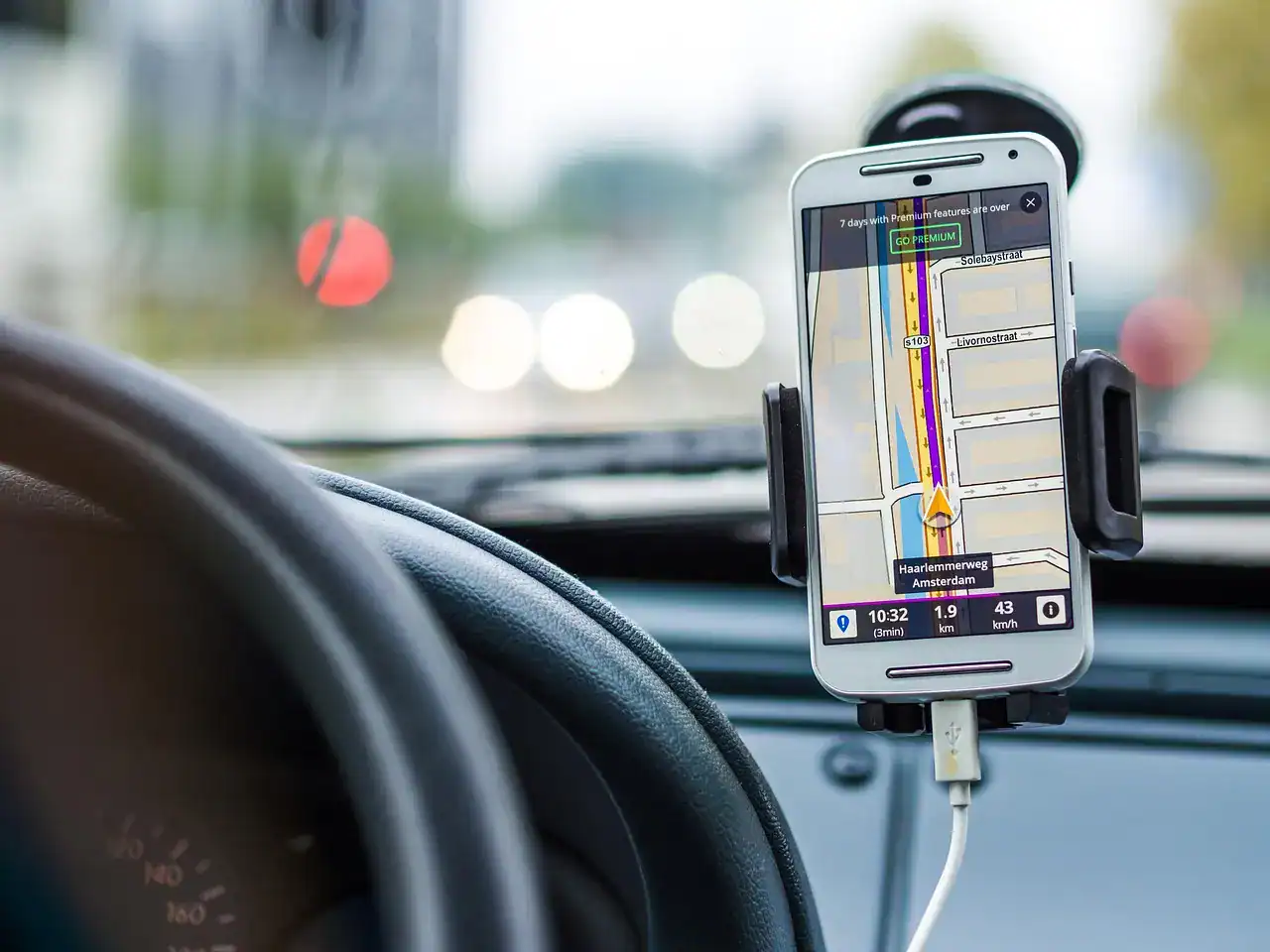
- Connect to home Wi-Fi. Polaris, for one, only downloads map regions over Wi-Fi.
- Download the whole area, including the roads in and out, not only the trail.
- Turn on airplane mode and confirm the maps, your GPS dot and your saved route still load.
- If you use Google Maps for the drive in, check the offline map has not expired. Google updates areas automatically over Wi-Fi when they are 15 days or less from expiring.
- Save the route as a GPX or recorded track in a second app if you can, so one app crash does not leave you without a route.
A phone with a cracked screen or a dead battery is the usual way these plans fail. Treat the setup like a recovery kit: test it at home, not at the trailhead.
Power, mounts and a paper backup

GPS use drains a battery quickly, so carry a USB power bank and a cable. A solid rugged phone mount keeps the screen visible without you holding it. A simple magnetic compass and a paper map of the area still work with no power.
For a dedicated unit instead of a phone, read our guide to the best GPS units for off-roading. Before a trip, work through our Jeep trail prep checklist as well, and run the free off-road calculators for tire pressure and gearing.
Tell someone your route and return time. Apps cannot call for help in a place with no signal.
Common questions
For finding trails open to your vehicle, onX Offroad is the most direct tool. Trails Offroad has the most trail detail, and Gaia GPS is the stronger planner. Many owners use two.
Which off-road apps work with CarPlay or Android Auto?
onX lists CarPlay and Android Auto support on its Premium plan, and Trails Offroad lists both on its site. Download maps to the phone first.
Which app works on an iPad?
Several of these apps have iOS versions. Apple shows iPad compatibility on each App Store listing, so confirm it there before you pay.
Do off-road apps work without cell service?
Yes, if you downloaded the maps first. GPS positioning itself does not need a data connection.
OsmAnd, Avenza and the free tiers of Gaia GPS and AlpineQuest cover real offline navigation at no cost. Trail finders like onX and Trails Offroad hold their best features behind subscriptions.
Do I still need a paper map?
On a remote trip, yes. A paper map and compass cover a dead battery, a cracked screen or a lost phone.
Related guides
- onX Offroad vs Gaia GPS: which app is better
- Best 4x4 off-road trails in Ohio
- Best off-road trails near Las Vegas
- Off-road tire pressure guide

I'm Suryashankar Dasgupta, the founder of Off-Road Handbook. I've been off-roading for years in the USA, including California and Texas, and have ridden mountain and desert terrain abroad. I've also driven a Jeep Compass for more than seven years, so I know the day-to-day side of Jeep ownership first-hand, from the Uconnect screen to the warning lights. Every guide here is researched from manufacturer owner's manuals, NHTSA recall and service-bulletin records and other trusted sources, checked against them before it is published, and corrected when we find a mistake. You can read how we work in our editorial policy: https://offroadhandbook.com/editorial-policy/
Like our off-road guides? Add Off-Road Handbook as a Google Preferred Source so our latest Jeep, ATV, UTV, trail, recovery, and off-road troubleshooting articles can appear more often in your Google Search experience.
Add us as a Preferred Source