Jeep Compass Touchscreen Not Working? Common Causes and Fixes
Last updated on October 26th, 2026 at 07:53 pm
A frozen or blank Jeep Compass touchscreen is most often a radio software hang. Jeep's 2021 Compass owner's manual says to push and hold the Volume & On/Off button for about 10 seconds to reset the radio and recover a frozen or stuck screen.
If the screen keeps coming back, the next suspects are fuse F36, a phone or USB device, or radio software that Jeep has patched in bulletins for 2017 to 2020 and 2022 to 2023 Compasses. Older advice to hold the volume and tuner knobs together does not match the manual.
Compass touchscreen symptom, cause and first fix
Match what you see to the likely cause below. Each row names where the advice comes from, so you can tell Jeep sources from shop practice.
| What you see | Likely cause | First fix | Source |
|---|---|---|---|
| Frozen or stuck, nothing responds | Radio software hang | Hold Volume & On/Off about 10 seconds | 2021 manual |
| Screen black, sound still plays | Screen switched off, or a software fault (2017 to 2018) | Press Screen Off or tap the screen, then reset | 2021 manual, bulletin 08-040-20 |
| No picture, no sound, no lights | Power loss: fuse F36 or a weak battery | Check F36 (20 A), same amperage only | 2021 and 2023 manuals |
| Ghost touches on an 8.4-inch screen | Radio software (2019 to 2020) | Dealer radio update by VIN and build date | Bulletins 08-085-19, 08-039-20 |
| Lines across the screen, blank control screen (2018, 8.4-inch) | Radio software, then the display | Dealer update, then display diagnosis | Bulletin 08-016-19 Rev. F |
| Freezes or drops with a phone plugged in | Cable, USB drive or CarPlay link | Unplug everything and restart | 2021 manual, bulletin 08-040-20 |
| No rearview image (2022 to 2023) | Radio software | Free dealer or over-the-air update | Recall 24V436 |
| Bubbles under the glass, cracks | Physical damage to the display | Dealer quote; no software fix | Shop practice |
Start with the cheapest fix. A reset costs nothing and takes about 10 seconds.
Do not buy a screen or radio until you have ruled out a reset, a fuse and software.
How to reset a Jeep Compass touchscreen
Rule out a screen that is only switched off first. Some Compass radios have a Screen Off button on the faceplate. The manual says pushing it turns the screen off, and pushing it again or tapping the screen turns it on.
- Park the Jeep and start the engine, or turn the ignition to ON.
- Push and hold the Volume & On/Off button for about 10 seconds. Do not tap the screen while you hold it.
- Release the button when the screen goes dark or the logo appears, then wait for the radio to restart.
- Wait a minute before touching the screen again.
That 10-second hold is the one reset the 2021 manual describes. It is not a settings wipe. The manual lists Restore Settings and Clear Personal Data as separate menu options, and says Clear Personal Data removes Bluetooth devices and presets.
Compasses from 2022 use Uconnect 5. The 2023 manual sends you to a separate radio manual that was not available for this guide. Jeep's Wagoneer Uconnect 5 manual says to hold the Power button for at least 15 seconds. Treat that as the best available figure, not a Compass-confirmed one.
Which Compass do you have?
The reset, the fuse and the software bulletins depend on the model year and the radio. The sales codes in the bulletins separate the screens.
Look at the screen size and the year. Then use the table to see which bulletin to ask the dealer about.
| Model year | Radio and screen | Reset | Bulletin or recall to ask about |
|---|---|---|---|
| 2017 to 2018 | Uconnect 3 (5-inch), Uconnect 4 (7-inch), Uconnect 4 or 4C (8.4-inch) | Volume & On/Off about 10 seconds (2021 manual; older manuals not opened) | 08-040-20; 2018 with 8.4-inch 4C: 08-016-19 Rev. F; early Nav radios: 08-134-23 |
| 2019 to 2020 | Same radios as 2017 to 2018 | Same | 2019: 08-085-19; 2019 to 2020 earlier builds: 08-039-20 Rev. A |
| 2021 | Uconnect 4 (7-inch) or 4C (8.4-inch) | Volume & On/Off about 10 seconds (2021 manual) | No Compass radio bulletin found for 2021; dealer checks VIN |
| 2022 to 2023 | Uconnect 5 (8.4-inch or 10.1-inch) | Power button, 15 seconds (Wagoneer manual, Compass not verified) | 08-172-24 (built before Aug. 14, 2023); recall 24V436 |
Bulletin coverage depends on the build date and radio sales code. A dealer can check your VIN. You cannot tell from the dash alone.
The 2021 manual also lists a System Information screen in Settings, which it says displays radio system information. Have it open when you call the dealer.
The order to check things in
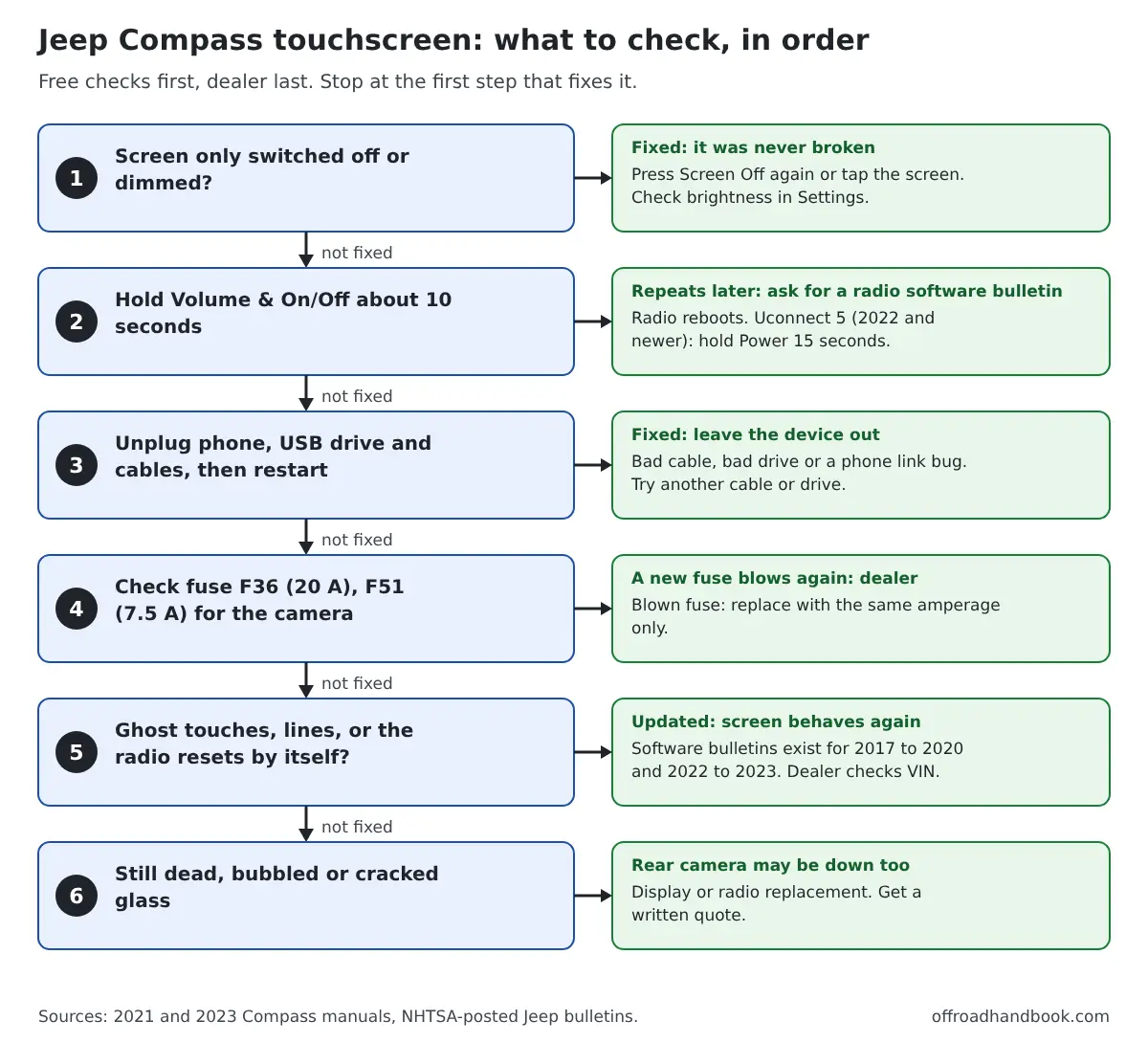
Work down the chart and stop at the first step that fixes it. The free checks come first, and the dealer comes last.
The order matters. A fuse check is quick, but a reset fixes more screens, so the reset comes before it.
Which fuse feeds the Compass touchscreen?
If the screen has no picture and no sound, check power. Both the 2021 and 2023 manuals put the radio on fuse F36 in the interior fuse panel.
That panel sits on the driver side under the instrument panel. The manual lists the same fuse for the USB port and climate control, so a dead radio, USB port and climate screen together points at F36.
| Fuse | Rating | Circuits listed in the manual | What it means for the screen |
|---|---|---|---|
| F36 | 20 A | Intrusion module/siren, radio, UCI/USB port, VSU, climate control, electronic steering lock, power folding mirrors, security gateway | Radio dead, USB port dead, or climate screen dead |
| F51 | 7.5 A | Electronic climate control, occupant classification, rear view camera, headlamp leveling, terrain select, heated rear window, trailer tow | Camera image missing |
| Rear cargo F02 | 25 A | HIFI audio system (if equipped) | Screen works but the amplified audio is dead |
Turn the ignition off before you pull a fuse. The manual says to replace a blown fuse only with the same amp rating. Never use a higher rating, wire or other material.
If the new fuse blows again, the manual says to contact a dealer. That points to a short, not a software problem.
Phone, USB or CarPlay causing the freeze
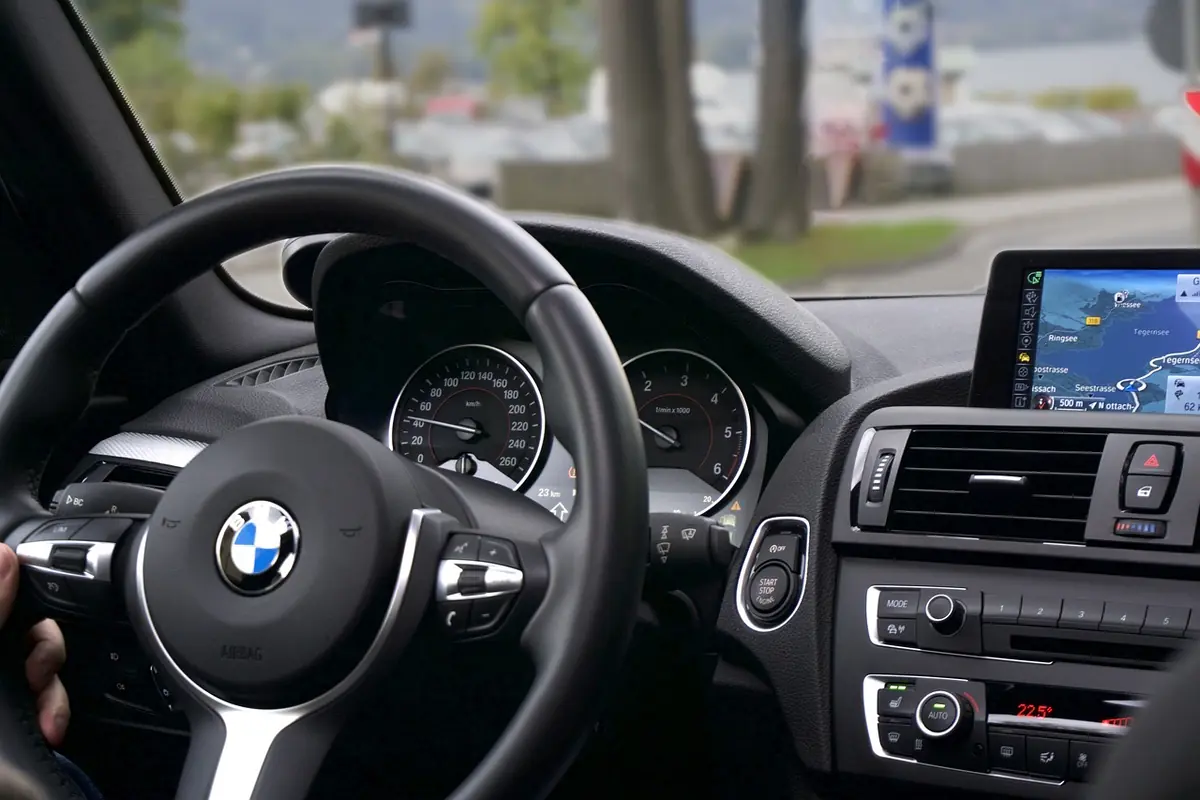
Some freezes start when a phone or drive is plugged in. Jeep's bulletins list Bluetooth that will not reconnect after Apple CarPlay is disconnected for 2017 to 2020 Compasses.
The manual also says to insert only media from a trusted source, so test with everything unplugged. A dead USB port is a separate problem, covered in our Grand Cherokee USB port guide.
- Unplug every phone, cable and USB drive.
- Restart the Jeep and wait for the screen to load.
- Plug in one device at a time with a different cable.
- Delete the phone from the Compass and from your phone's Bluetooth list, then pair it again. This is shop practice, not a Jeep step.
Compass radio software bulletins by model year
Jeep has issued several radio software bulletins for the Compass. A bulletin is a dealer repair instruction, not a recall. The dealer needs your VIN and build date, because each one covers only certain radios.
| Bulletin | Compass years and radios | Symptoms listed | What the dealer does |
|---|---|---|---|
| 08-016-19 Rev. F (Oct. 2019) | 2018, 8.4-inch 4C radios (US and Canada) | Frozen or blank control screen, lines across the screen, blank backup camera screen, radio resets, cannot adjust volume | Radio software 21.9 from a 16 GB USB drive |
| 08-040-20 (Mar. 2020) | 2017 to 2018, 5-inch, 7-inch and 8.4-inch radios | Display turns black while the radio still works, radio resets, Bluetooth will not reconnect after CarPlay | Radio software 23.02.30.10; 0.3 h listed; up to 18 minutes of loading |
| 08-085-19 (Aug. 2019) | 2019, same radios | Ghost touch on 8.4-inch screens | Radio software 23.01.74.15 |
| 08-039-20 Rev. A (Aug. 2020) | 2019 to 2020, earlier builds | Bluetooth after CarPlay; ghost touch on 8.4-inch | Radio software 23.02.30.10 |
| 08-134-23 (May 2023) | 2017 to 2018, early-built 8.4-inch Nav radios | Radio may reset or go blank (rear camera not affected) | Radio software 18.7 or 18.8; 0.5 to 0.7 h listed |
| 08-172-24 (July 2024) | 2022 to 2023 built before Aug. 14, 2023, Uconnect 5 | Blank display with camera working, inoperative touchscreen, lost presets, phone pairing faults, media port codes | Radio software R47.03.26; 0.6 to 1.0 h listed |
The hours are dealer labor times, not prices. None of these bulletins lists a price, and no reliable repair-cost average was found, so get a written quote if warranty does not cover it.
Updating can reset the radio to factory settings, according to the bulletins. Write down your presets and re-pair your phone afterward. The flash needs the engine running, and bulletin 08-016-19 warns that a failed update with other devices plugged in can mean a replacement radio.
Owners cannot always do it themselves. Jeep's Uconnect software update page says 2020 and newer models will not have the latest USB updates for customer download. Connected vehicles can get over-the-air updates through Wi-Fi settings, and the page says to ask a dealer for older years.
Recall 24V436 also covers 2022 to 2023 Compasses: radio software may prevent the rearview image from displaying. The NHTSA record says the fix is free, at a dealer or over the air.
Ghost touches, lines and bubbles
Ghost touches, lines and bubbles can look like a hardware failure, but Jeep has software bulletins for the first two. Ask for a software check before you pay for a display.
Bubbles under the glass are physical damage. No bulletin covers them.
One parts seller says pre-facelift 7-inch Compass screens can develop lines that spread, and that 8.4-inch screens can bubble from heat and age. That is a vendor claim with no failure data, so treat it as a lead.
If lines or ghost touches continue after the right software update, the display or radio is the next suspect. A written quote comes before work begins.
Jeep Compass touchscreen checker
Pick your year, screen size and symptom. The tool lists your checks in order: free ones first, then tools, then the dealer.
It uses only the manuals, bulletins and recall in this post. Shop-practice steps are labeled.
The checker cannot read your radio's software level. It orders the checks so you do not pay for a display before a reset, a fuse and a software check.
If it says to back up with a spotter, do that. A missing rearview image is a safety issue, not a convenience problem.
Does disconnecting the battery reset the screen?
Some owners disconnect the battery to reboot the radio. No Jeep source opened for this guide recommends it. The only radio reset in the 2021 manual is the 10-second Volume & On/Off hold.
A battery disconnect also clears other learned settings. Bulletin 08-016-19 lists an anti-theft code request as a radio software symptom for 2018 Compasses, so a radio that asks for a code after battery work is worth a dealer visit.
When to see a dealer
- The screen stays dead after a reset and the F36 fuse check.
- A new fuse blows again.
- The screen shows lines, ghost touches or bubbles after a reset.
- The radio resets repeatedly or goes black while driving.
- The rearview camera image is missing. Back up with mirrors and a spotter until it is fixed.
Ask the dealer to check your VIN for open bulletins and recalls. You can also check recalls yourself at nhtsa.gov/recalls, where it costs nothing.
If the Jeep is under warranty, ask them to cover the repair. For other Uconnect screen problems, including Grand Cherokee and Wrangler, see our Jeep Uconnect touchscreen guide. For a radio that has no sound at all, see Jeep radio not working.
Other Jeep models, or a different electrical fault? Our Jeep electrical and Uconnect problems guide matches each symptom to its fix.
FAQ
How do I reset the touchscreen on a Jeep Compass?
With the engine running, push and hold the Volume & On/Off button for about 10 seconds. The 2021 manual says this resets the radio and can recover a frozen screen. On 2022 and newer Uconnect 5 radios, the Wagoneer manual says to hold Power for 15 seconds.
What fuse controls the touchscreen on a Jeep Compass?
Fuse F36, 20 A, in the interior fuse panel under the dash on the driver side, in the 2021 and 2023 manuals. It also feeds the USB port and climate control. Check the label for older years.
Why is my Compass radio screen blank after an update?
Bulletin 08-040-20 says black screens appear several times for a few minutes during an update, and that the update is finished only when a normal screen returns. Do not cycle the ignition during the flash. If it was interrupted, bulletin 08-172-24 says to restart it.
Does a reset delete my presets?
The manual describes the 10-second hold only as a reset that can free a frozen screen. It lists Restore Settings and Clear Personal Data as separate menu options. A dealer software update can reset the radio to factory settings.
Will a dealer update fix a ghost-touch screen?
Maybe. Bulletins 08-085-19 and 08-039-20 list ghost touch on 8.4-inch screens for 2019 to 2020 Compasses and name a software update. If the problem returns after the right update, the display is the next suspect.

I'm Suryashankar Dasgupta, the founder of Off-Road Handbook. I've been off-roading for years in the USA, including California and Texas, and have ridden mountain and desert terrain abroad. I've also driven a Jeep Compass for more than seven years, so I know the day-to-day side of Jeep ownership first-hand, from the Uconnect screen to the warning lights. Every guide here is researched from manufacturer owner's manuals, NHTSA recall and service-bulletin records and other trusted sources, checked against them before it is published, and corrected when we find a mistake. You can read how we work in our editorial policy: https://offroadhandbook.com/editorial-policy/
Like our off-road guides? Add Off-Road Handbook as a Google Preferred Source so our latest Jeep, ATV, UTV, trail, recovery, and off-road troubleshooting articles can appear more often in your Google Search experience.
Add us as a Preferred Source